Sucker for Love Crush Landing How to Play Crush Landing
Camera, flame HUD, visitors, and the settings that keep the date readable.
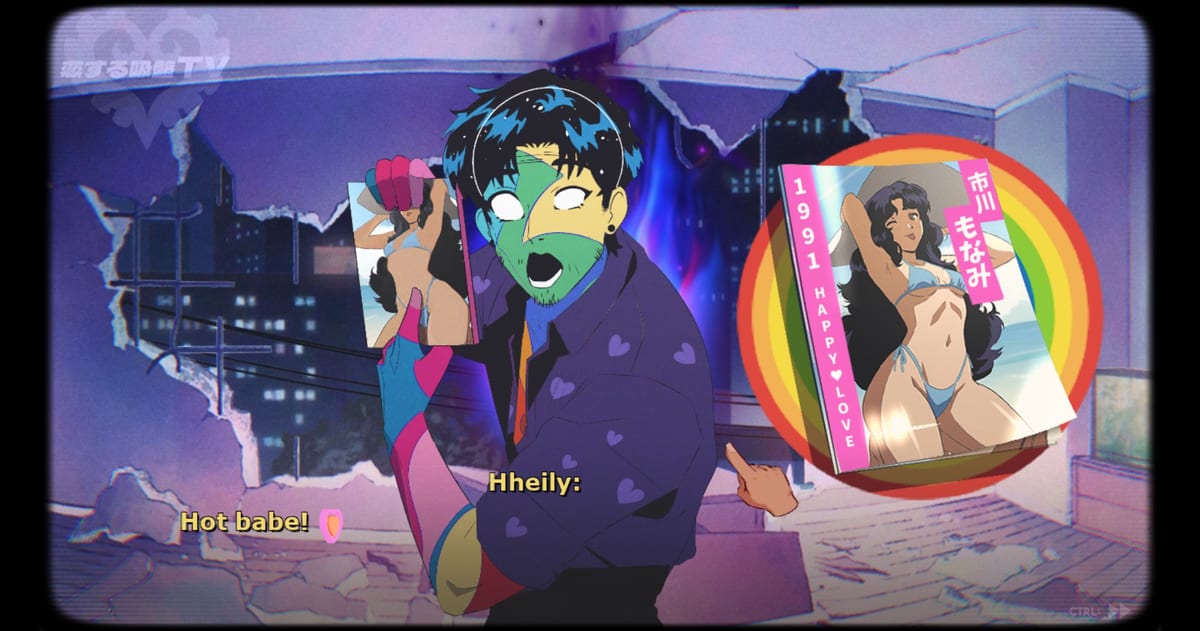
Sucker for Love: Crush Landing plays like a point-and-click visual novel with a resource clock, not like a visual novel you can leave on autoplay. You orbit a hand-drawn apartment, click props, answer the door, and feed a meteorite specific colors while a flame bar tells you how close Hheily is to going dark. This page is the control and HUD manual. For the opening story beats, use getting started. For the color rules, use how to feed Hheily.
Platforms and input
The Steam build is Windows-only at launch. Store flags include full controller support for Xbox and PlayStation pads, a mouse-only option, custom volume sliders, and save-anytime. You can play the entire apartment with a mouse. A pad is comfortable for camera orbit and UI, but pixel hunting colored props is still easier with a cursor.
Steam Deck compatibility was listed as unknown on the store page at launch. If you play portable, keep a keyboard or the on-screen keyboard available for any text-entry jokes, and bind a back button to the interact prompt.
Camera and the 360 apartment
The room is not a set of static CGs. It is a 360-degree 2D environment, the original Sucker for Love apartment rebuilt so you can spin, inspect the hole in the wall, and find items on counters, in the fridge, and in the freezer. Move slowly the first time. The game hides colors in ordinary host clutter: grapes, gifts, plants, seafood, bath products, fish food. If you treat the camera like a cutscene, you will miss the board.
Click to inspect, then click again to take or feed. Dialogue uses the series’ yellow subtitle style with a CTRL skip marker in the corner. A Next Fest demo update added Tab to hide text for screenshots; if that binding shipped in the full game, use it when you are inventorying colors without spoiling a line.
Reading the HUD
After Hheily is in play, the interface stops being a pure novel and starts looking like a light management game:
- Color dots — the palette you still need or have already banked. Empty or greyed dots are the reason people open this wiki.
- Heart markers — romance / date status, not a street-fighter health bar. Do not assume three hearts means you can dump junk into the flame.
- Flame bar — Hheily’s glow. When this drains, you are on a bad clock toward Blackout-style fails.
- Timer — during the assistance wait, a real-time countdown sits at the top. That is your license to search, not to idle.
If the flame is healthy and a color dot is still empty, go hunting. If the flame is dying and you only have duplicate colors left, you already spent the unique hues too early. Restore from the save you made in getting started.
Dialogue, language, and voice
The game is fully voiced in English. Lenval Brown is among the performers called out by players after launch. Hheily’s speech is mechanically limited: she recycles your words until she learns new ones. That is why dumping slang or skipping lines can make her sound broken. Speak in complete, useful vocabulary if you want her human form to talk like a person. The romance guide treats this as a dating system, not as flavor text.
Auto-advance is a trap during visitor scenes. Flora’s flower offer and the scammer at the door are easy to misclick if you are mashing. Play visitor beats like a point-and-click: hear the pitch, then slam the door or take the item.
Saves, achievements, and cloud
Steam Cloud is enabled. There are 19 achievements at launch. Community threads already mention a missing story tree / endings gallery, a possible secret ending bug, and a save error when creating more than three files in an older demo build. In the full game, keep more than three saves anyway: one pre-touch, one post-Hheily, one before each unique color, one before you extinguish or overfeed.
This is a single-player game. There is no multiplayer, no shared apartment, and no reason to wait for a friend. Your only coordination is with the ending checklist.
Settings worth changing immediately
- Volume sliders exist because the soundtrack and the voice work are doing a lot. Drop music a notch if you need to hear knocks.
- Photosensitive warning: some playthroughs strobe when the colour really gets going. If you are sensitive, sit farther back and avoid maxing effects.
- Mature content: the store lists general mature content. Expect body horror, rotting plants, a necrotized hand, and dating-sim thirst. There is no explicit sex scene advertised; the joke is still gross.
A simple play loop
- Orbit the room and list every colored prop (see the colored items list).
- Check the flame bar. Feed only if the glow is actually dropping or a puzzle asks for a hue.
- When the door knocks, decide with the supporting cast notes, not panic.
- Talk to Hheily in human form with words you are willing to hear repeated.
- Save. Then spend a color.
If you want a directed route through those steps, the puzzle walkthrough and the full walkthrough exist. If you only wanted to know which button does what, you can stop here and go on a date.
Frequently Asked Questions
Quick answers to the most common questions.
Can I play Crush Landing with a controller?
Yes. Steam lists full controller support. Color hunting is still easier with a mouse in the 360-degree apartment.
What do the colored dots on the HUD mean?
They track the pigment puzzle. Feeding a color consumes that hue for later items. Details are in how to feed Hheily.
Does Crush Landing have an endings gallery?
Launch discussions complained that a story tree / gallery was missing. Track names yourself with the ending checklist.
Is there a skip or hide-text key?
Dialogue can be advanced and skipped in the usual visual-novel way. The demo added Tab to hide text for screenshots; check your build’s key list.